RX 5700 benchmark with i7-8700K 1080p, 1440p, Ultrawide, 4K benchmarks at Ultra Quality
With some tuning, the RX 5700 makes the most sense for gamers with 4K monitors. Though serious gamers hardly play at 4k. It is worth noting that the RX 5700 is a very power hungry card and requires a decent power supply unit. In terms of memory, the RX 5700 's 8192 MB RAM is more than enough for modern games and should not cause any bottlenecks. In short the performance is exceptional, there's no question that this is one of the most powerful single GPU out there in 2026 .

The good news is, with the release of the RX 5700 XT, the RX 5700 's price is getting more discount. AMD ’s xx00 cards have always been defined by mid-range prices with performance that knocks on the door of high-end graphics cards – especially when overclocked. After taking the time to fully test the RDNA 1.0 graphics card inside the RX 5700, we can say without a doubt that it continues the trend.
Spec for spec, this RX 5700 leapfrogs its direct predecessor, the RX Vega 56, by boasting 17.5 % more fps. In our synthetic benchmarks, the RX 5700 blows past the RX Vega 56 and, amazingly, even the RX Vega 64 as well.
Compared to its NVIDIA 's closest rival, RTX 2060, the RX 5700 was 4.5 % faster. Fortunately, gaming performance was quite impressive. The RX 5700 consistently delivers great frame rate increases over the RX Vega 56 and it really justifies an upgrade.
For 1080p Full HD, we were able to play A Plague Tale: Requiem, Dead Space, Metro Exodus, God of War, Assassin's Creed Odyssey at 62 fps to 63 fps and kept frame rates hovering around 62 fps. For 1440p Quad HD, we were able to play Anthem, Final Fantasy XV, Watch Dogs: Legion, Gears of War 5, Need For Speed: Heat at 61 fps to 65 fps and kept frame rates hovering around 63 fps.
For 2160p 4K, we were able to play World War Z, F1 2018, Overwatch 2, Valorant at 65 fps to 160 fps and kept frame rates hovering around 92 fps.
Assassin's Creed Valhalla (2020)
Ultra Quality
Resolution 1920x1080
The RX 5700 sits between the RX 5700 XT and the RTX 2060 SUPER, falling slower than RX 5700 XT by 8% and faster than RTX 2060 SUPER by 0.4%. It has an average relative performance against every graphics card here. It is a close call between the RX 5700 and its rival RTX 2060 by a small margin. In addition, the RX 5700 was also faster than the RX Vega 56 by a good margin.
Forza Horizon 4 (2018)
Ultra Quality
Resolution 1920x1080
The RX 5700 sits between the GTX 1070 Ti and the GTX 1660 Ti, falling slower than GTX 1070 Ti by 4.2% and faster than GTX 1660 Ti by 1%. It has an average relative performance against every graphics card here. In addition, the RX 5700 was also faster than the RX Vega 56 by a good margin.
Cyberpunk 2077 (2020)
Ultra Quality
Resolution 1920x1080
The RX 5700 sits between the RX 5700 XT and the RTX 2060 SUPER, falling slower than RX 5700 XT by 8% and faster than RTX 2060 SUPER by 0.4%. It has an average relative performance against every graphics card here. It is a close call between the RX 5700 and its rival RTX 2060 by a small margin. In addition, the RX 5700 was also faster than the RX Vega 56 by a good margin.
Grand Theft Auto V (2015)
Ultra Quality
Resolution 1920x1080
The RX 5700 sits between the GTX 1070 and the RTX 3050, falling slower than GTX 1070 by 0.3% and faster than RTX 3050 by 1.5%. It has an average relative performance against every graphics card here. Its results are actually indistinguishable from those of the GTX 1070. In addition, the RX 5700 was also faster than the RX Vega 56 by a good margin.
Call of Duty Modern Warfare (2019)
Ultra Quality
Resolution 1920x1080
The RX 5700 sits between the RTX 2070 and the RTX 2060 SUPER, falling slower than RTX 2070 by 8% and faster than RTX 2060 SUPER by 0.4%. It has an average relative performance against every graphics card here. Those who have a high refresh rate monitor will enjoy what RX 5700 has to offer as it averages 137 fps. It is a close call between the RX 5700 and its rival RTX 2060 by a small margin. In addition, the RX 5700 was also faster than the RX Vega 56 by a good margin.
Game Performance at Ultra Quality settings
Change Quality Settings
Resolution 1920x1080
Resolution 2560x1440
Resolution 3440x1440
Resolution 3840x2160
Compare Against Competitors




















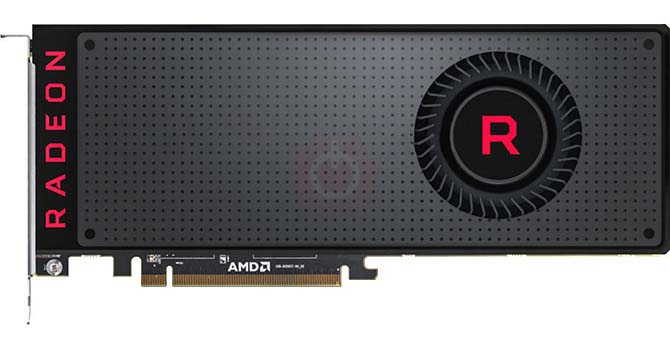




RX 5700 Specifications
RX 5700 Board Design
| Board Number | - |
|---|---|
| Length | 12 inches 305 mm |
| Outputs | 1x HDMI 3x DisplayPort |
| Power Connectors | 1x 6-pin + 1x 8-pin |
| Slot Width | Dual-slot |
| TDP | 180 W |
RX 5700 Clock Speeds
| Boost Clock | 1625 MHz |
|---|---|
| GPU Clock | 1465 MHz |
| Memory Clock | 1750 MHz |
RX 5700 Graphics Card
| Bus Interface | PCIe 4.0 x16 |
|---|---|
| Generation | Navi |
| Launch Price | 349 USD |
| Production | Unreleased |
| Release Date | Jul 7th, 2019 |
RX 5700 Graphics Features
| DirectX | 12.0 (12_1) |
|---|---|
| OpenCL | 2 |
| OpenGL | 4.6 |
| Shader Model | 6.4 |
| Vulkan | 1.1.108 |
RX 5700 Graphics Processor
| Architecture | RDNA 1.0 |
|---|---|
| Die Size | 251 mm² |
| GPU Name | Navi 10 |
| GPU Variant | Navi 10 PRO |
| Process Size | 7 nm |
| Transistors | 10,300 million |
RX 5700 Memory
| Bandwidth | 448.0 GB/s |
|---|---|
| Memory Bus | 256 bit |
| Memory Size | 8192 MB |
| Memory Type | GDDR6 |
RX 5700 Render Config
| Compute Units | 36 |
|---|---|
| ROPs | 64 |
| Shading Units | 2304 |
| TMUs | 144 |
RX 5700 Theoretical Performance
| FP16 (half) performance | 14,980 GFLOPS (2:1) |
|---|---|
| FP32 (float) performance | 7,488 GFLOPS |
| FP64 (double) performance | 468.0 GFLOPS (1:16) |
| Pixel Rate | 104.0 GPixel/s |
| Texture Rate | 234.0 GTexel/s |
What to Consider Before Buying a Graphics Card
If you have been planning to upgrade your system by purchasing a new graphics card. Then there are some important factors to consider.
Resolution VS Quality: Impact on Game Performance
What affects game performance? Clarity or Details?
Ultra VS High Quality Settings in PC Games
Every player has a different notion about the ideal setting for PC games. But in most cases, opting for a High quality graphics configuration is the way to go.
What are CPU or GPU Bottlenecks?
Are you getting sudden frame drops? you might have a bottleneck.
What is the acceptable FPS speed for me?
For some games, you can still enjoy great garphics at lower frame rates.
GPU Hierarchy
GPU Compare
CPU Compare
Gaming Laptops
Gaming Monitors
Gaming Headsets
Discussion and Comments
Share Your Comments